Automation feature guide

CS2 triggerbot control, from simple to precise.

Automatically fire when your crosshair reaches a valid target, with delay and activation controls that match your weapon and preferred style.

  • Crosshair activation
  • Adjustable fire delay
  • Target and hitbox checks
  • Per-weapon configuration
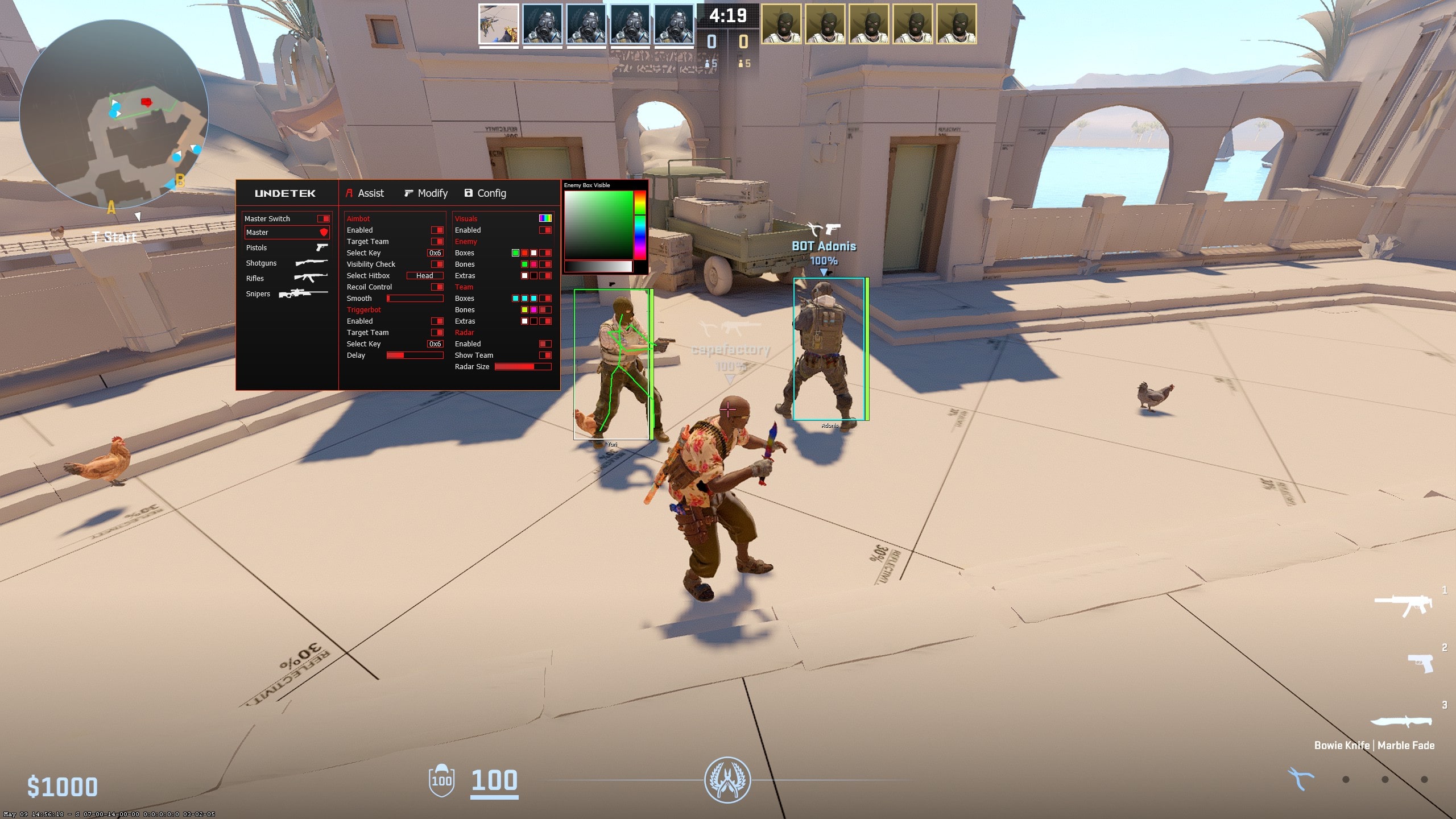
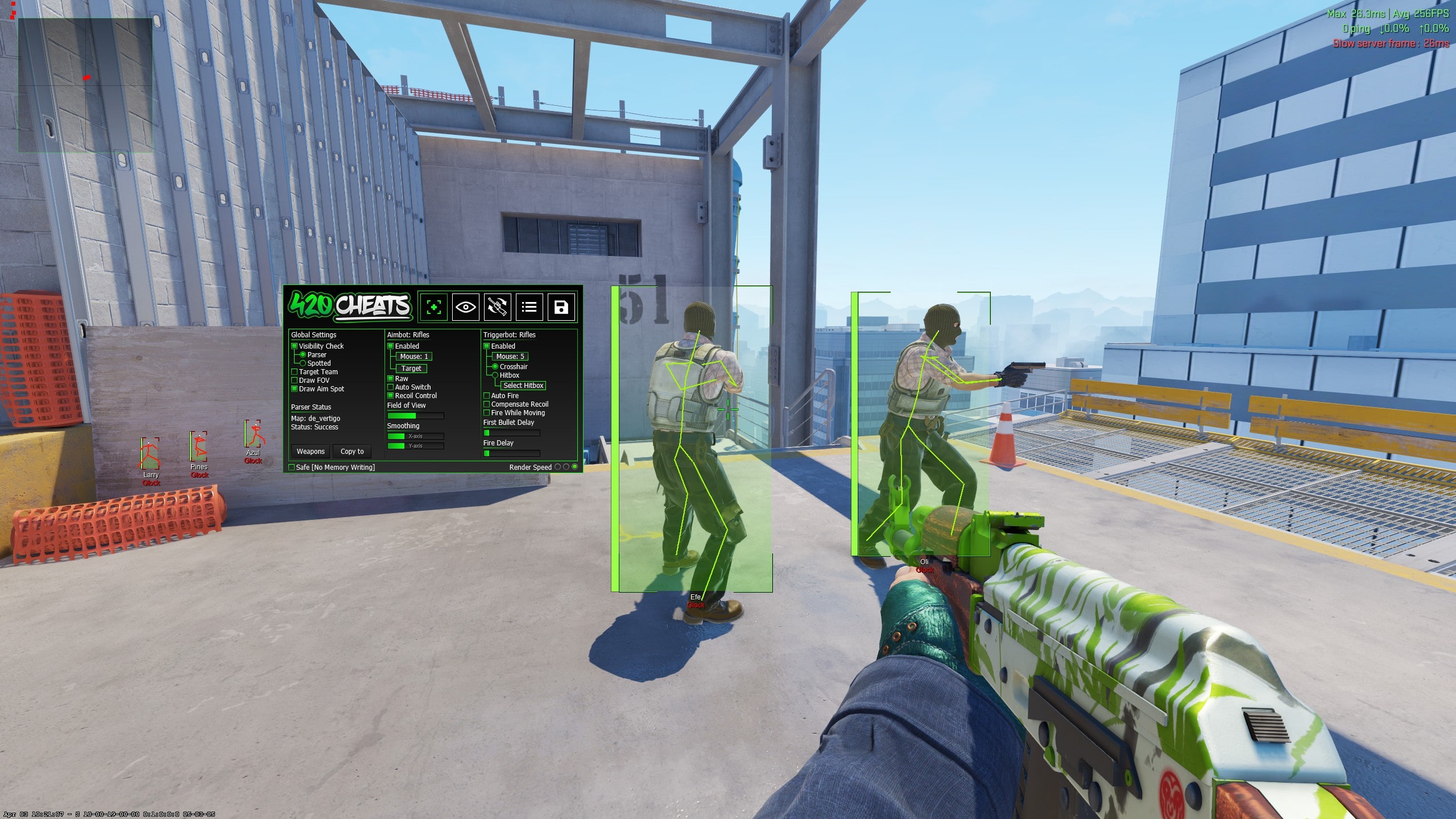
CS2 triggerbot and aimbot settings panel
Quick answer

A CS2 triggerbot activates fire when the existing crosshair meets a valid target; it does not move the crosshair like an aimbot. The free build and Undetek+ provide simpler trigger controls, while iCheat Pro and 420Cheats Pro add more detailed timing, target and weapon configuration.

01

How a CS2 triggerbot works

A triggerbot monitors the point under your crosshair and activates the fire input when it identifies a valid target. It can be used by itself or alongside aimbot and ESP, depending on the product and configuration.

Because triggerbot reacts to where you already aim, crosshair placement still matters. The feature can reduce the delay between a valid target reaching the crosshair and a shot, but it cannot replace movement, positioning or weapon control.

02

Activation keys and deliberate control

An activation key restricts when the triggerbot is allowed to operate. A deliberate key is easier to test than an always-active configuration because you can compare normal input and automated fire without changing the rest of the menu.

Confirm the key first with every delay and target option at a known value. If a shot happens unexpectedly, disable other features and test triggerbot alone before changing multiple settings at once.

03

Fire delay, targets and hitboxes

Fire delay controls how quickly the shot happens after a target is identified. A very short value prioritises response; a longer supported value changes the timing. Target, team, visibility and hitbox checks can narrow the conditions under which the feature fires.

Menu labels and available checks vary between products. iCheat Pro and 420Cheats Pro provide the deepest configuration in the current comparison, while the free build and Undetek+ keep the initial choices shorter.

04

Weapon-specific trigger settings

Different weapon categories reward different timing. A pistol, rifle and sniper rifle should not be assumed to need the same configuration. Advanced weapon profiles are useful when you want supported timing or activation choices saved separately.

Test one category at a time and save a known working profile before creating another. A simple product can be a better fit when you prefer one predictable setup and do not want to maintain several profiles.

05

Triggerbot versus aimbot

Triggerbot activates fire; aimbot assists crosshair movement. They can be enabled independently, and troubleshooting is easier when each is tested separately. If the crosshair moves unexpectedly, inspect the aimbot configuration. If firing happens at the wrong moment, inspect trigger activation, delay and target rules.

Combining the two increases automation and can create more consistent, noticeable behaviour. Product status does not prevent gameplay reports or VACNet cooldowns, so the configuration should never be treated as risk-free.

06

Simple or advanced triggerbot?

The free CS2 cheat is the no-cost introduction. Undetek+ provides the essential trigger function inside the lowest-priced paid full suite. iCheat Pro and 420Cheats Pro add more detailed controls for users who want to tune timing and behaviour around different weapons.

The dedicated Skin Changer and CS2 Web Radar do not provide triggerbot. Compare full-term prices and the rest of the feature set before paying more solely for advanced trigger controls.
Step-by-step setup

How to get started

Follow the current instructions supplied with the download if they differ after a game or product update.

  1. 01

    Confirm the current product status

    Use the newest release and recheck compatibility after Counter-Strike 2 updates.

  2. 02

    Test triggerbot by itself

    Temporarily leave aimbot and other automation off so firing behaviour is isolated.

  3. 03

    Choose an activation key

    Confirm the trigger stays inactive until the selected key condition is met.

  4. 04

    Set the fire delay

    Start from a controlled value and change only the timing before adding more rules.

  5. 05

    Add target and weapon rules

    Configure supported visibility, hitbox or weapon choices one at a time.

  6. 06

    Save a known working profile

    Keep a stable configuration to compare after future product or game updates.

Side-by-side

Compare CS2 triggerbot choices

All four gameplay suites include triggerbot; configuration depth and price separate them.

OptionTrigger controlBest suited toStarts at
Free CS2 CheatsBasic activationTrying triggerbot freeFree
Undetek+Simple triggerbotLower-cost full suite$4.49
iCheat ProAdvanced timing and target controlsDetailed profiles$5.99
420Cheats ProAdvanced timing and target controlsDetailed profiles$5.99

Common questions

What players ask

Does triggerbot move my aim?+

No. Triggerbot activates the shot when your existing crosshair meets a valid target; aimbot is the feature that assists aim movement.

Can triggerbot use a delay?+

Yes. Supported products include a configurable delay so the shot does not have to be immediate.

Which products include triggerbot?+

Undetek+, iCheat Pro and 420Cheats Pro include triggerbot features. The dedicated Skin Changer does not.

Is there a free CS2 triggerbot?+

Yes. The free CS2 cheat includes a basic triggerbot with activation controls.

What does trigger delay change?+

It changes how long the supported feature waits between recognising a valid target and activating fire.

Can triggerbot use different weapon profiles?+

The advanced products are the best fit for weapon-specific configuration. Confirm exact current options on the product page and menu screenshots.

Can I use triggerbot without aimbot?+

Yes. Triggerbot can react to the crosshair position without moving it. Test the two features independently before combining them.

Why might triggerbot fire unexpectedly?+

Check the activation key, delay, target, team, visibility and hitbox rules. Disable other automation and test one condition at a time.

Is triggerbot undetectable?+

No feature should be described as undetectable. The supplied history reports no known VAC detection for the retained products, but future detection, reports and VACNet cooldowns remain possible.

Your next move

Ready to find your CS2 cheat?

Compare features and pricing, or ask the community for help choosing the right product.